How it works: Live Content Blocking
Filter the internet, not their curiosity.
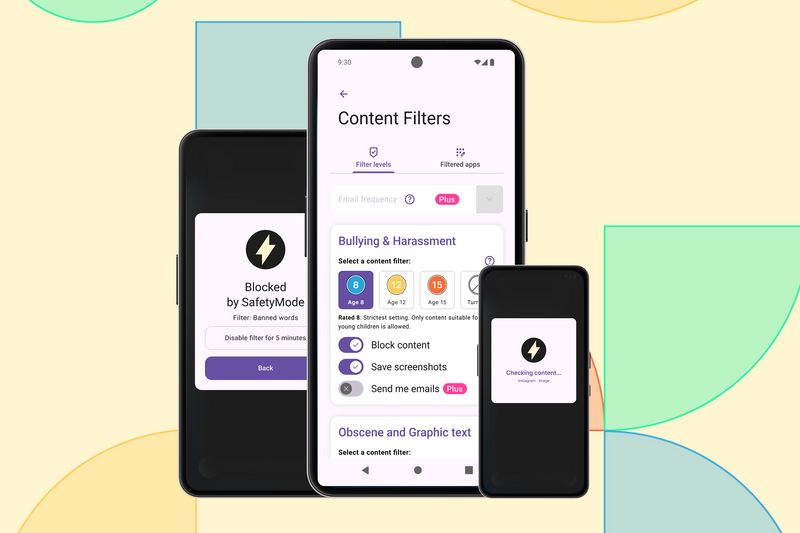
SafetyMode's content filters work in real time, blocking harmful websites, explicit content, and flagged keywords as they appear on your child's screen. Allow your child to explore what the internet has to offer without having to watch their every move. You set the level. The app handles the rest.

Why we built it:
1 in 3
children have seen content online that upset or worried them.
Ofcom, Children & Parents Media Use Report, 2024
65%
of 15-16 year olds have seen online pornography (28% of 11-12 year olds).
NSPCC / Children's Commissioner / Middlesex University, 2016
59%
of children who encounter pornography online do so by accident; it is sent to them or stumbled upon rather than searched for.
Children's Commissioner for England, 2023
How it works:
Real-time content filtering
Harmful websites and explicit content are blocked as your child browses, in real-time. World-first technology unavailable anywhere else.
Works in any app
SafetyMode software scans the screen across every single app, so however your child is connected to the internet, you know they're protected at all times. This extends to the photos app, which can interrupt the sharing and storing of nude images.
Block by category
Choose from preset categories; Nudity, Bullying & Harassment, Obscene & Graphic Language. Tighten or relax at any time from your Parent App.
Keyword blocking
Add specific words, phrases, or websites to block. Useful for things that don't fit neatly into a category or as culture changes; a particular game, a social platform, or anything you want off the table.
Flagged content alerts SafetyMode Plus Feature
Set up Email Alerts & Reports with SafetyMode Plus; receive an email alert when a filter is tripped. Check what content tripped the filter on the phone in case its of concern. As they get older set the filter to only report without blocking so you can only raise concern if it feels right.
Adjust remotely SafetyMode Plus Feature
Update filters from your own phone or laptop without touching the device. No negotiating, no asking for the phone back.
All the connection, without the risks.
It appears that SafetyMode are the only parental controls available that offer On-device Live Content Blocking in any app for obscene language, bullying and nudity.
What Is the Difference Between Live Content Blocking and Web Filtering, and Which Is Safer for Children?
Read article
SafetyMode vs Kids360: Why Blocking Apps Isn't the Same as Keeping Kids Safe Inside Them
Read article